
Repetition Is Usually the First Sign of an Automation Opportunity
Most businesses do not become inefficient all at once. Inefficiency usually develops through repeated manual steps that feel harmless in isolation. A team member copies information from an email into a spreadsheet. A manager sends the same reminder every week. A customer request gets manually categorized. A report is rebuilt from multiple sources. A file is renamed, sorted, and moved by hand.
None of these tasks may seem large enough to justify immediate attention. But when repeated across days, teams, customers, and systems, they become a hidden operational cost. Repetitive work consumes time, slows response speed, increases the chance of human error, and prevents people from focusing on higher-value decisions.
Turning repetitive tasks into automated systems begins with recognizing that the task itself is not the only issue. The larger issue is the absence of a reliable process.
Start by Identifying the Work That Keeps Coming Back
The first step is not choosing software. The first step is identifying the recurring work that already exists inside the business. Automation should begin with a real operational pattern, not with a tool in search of a problem.
A strong candidate for automation usually has several traits. It happens frequently. It follows a predictable sequence. It depends on information that can be captured or structured. It creates delay when handled manually. It does not require deep human judgment at every stage.
Common examples include lead intake, customer follow-ups, appointment reminders, order updates, invoice tracking, weekly reporting, document sorting, support triage, internal notifications, and content production steps. These tasks may belong to different parts of the business, but they share one important feature: they repeat.
Map the Process Before You Automate It
One of the most common mistakes in automation is trying to build too quickly. If the process is unclear before automation, the workflow will usually reproduce that confusion at a faster speed. Before anything is connected, the business needs to understand how the task actually works.
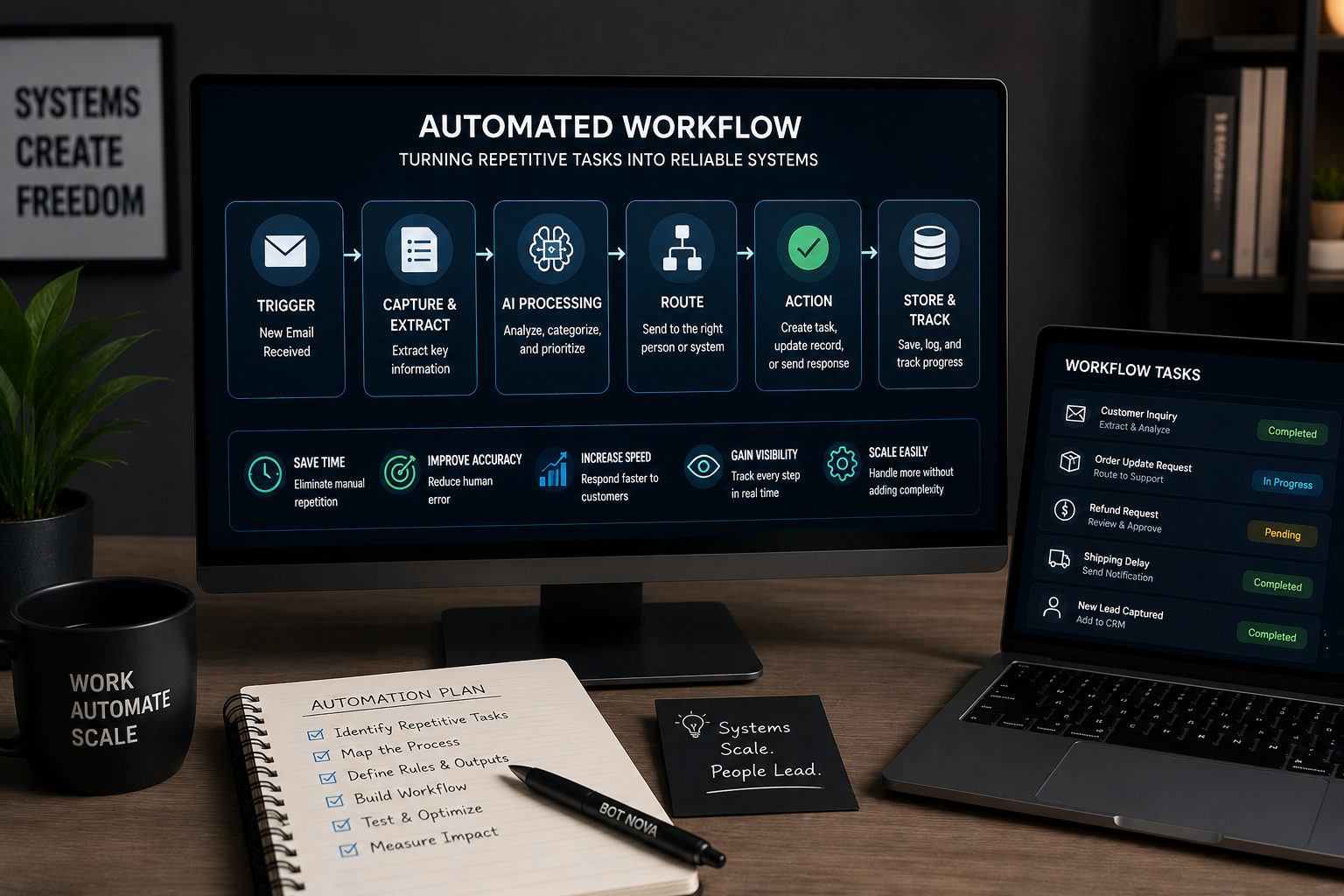
Mapping the process means breaking the task into its basic parts. What triggers the work? What information enters the process? Who reviews it? What decision needs to happen? What output should be produced? Where should the information be stored? What happens if something goes wrong?
This does not require a complicated diagram. A simple written sequence is often enough. The goal is to move the process out of someone’s memory and into a structure that can be reviewed, improved, and eventually automated.
Define the Trigger, Inputs, Rules, and Output
Every reliable workflow needs a clear structure. At minimum, it should include a trigger, defined inputs, business rules, and a desired output. Without those pieces, automation becomes fragile.
The event that starts the workflow — a form submission, a new email, a completed purchase, an uploaded document, a calendar date, or a change in a spreadsheet.
The information the workflow needs to function — a customer name, order number, request type, product name, deadline, payment status, or message content.
What the system should do with that information — route it to a person, draft a response, create a task, update a record, or flag it for review.
The final result — a saved record, a notification, a draft email, a completed report, an organized file, or a task assigned to the right person.
Decide Where Human Review Belongs
Good automation does not remove human oversight. It places human review where it is most valuable. This is especially important when workflows involve customer communication, financial information, compliance, brand voice, or decisions that require judgment.
Some steps can be fully automated because the rules are clear. Others should be prepared by automation but reviewed by a person before completion. For example, a workflow can summarize a customer complaint, gather order details, and draft a response. A team member can then review the tone and approve the final message.
This approach allows the business to gain speed without surrendering control. The system handles the coordination, while humans remain responsible for judgment.
Build the Workflow Around the Existing Business Reality
Automation works best when it reflects how the business actually operates. A workflow that looks impressive in theory may fail if it ignores the tools, habits, constraints, and responsibilities already in place.
If the team lives in email, the workflow should account for email. If customer data sits in Airtable, Google Sheets, Shopify, Squarespace, or a CRM, the workflow should connect to that reality. If approvals happen through Slack, Telegram, or a dashboard, the system should route decisions there instead of forcing a new behavior that the team will not maintain.
The goal is not to create a perfect abstract process. The goal is to design a workflow that improves the business without disrupting the people who have to use it.
Test With One Workflow Before Expanding
A business does not need to automate everything at once. In fact, trying to automate too much too quickly often creates unnecessary complexity. A better approach is to start with one workflow that solves a visible bottleneck.
The first workflow should be specific enough to test and valuable enough to matter. For example, instead of “automate customer support,” the business might start with “classify incoming support emails and draft responses for common order questions.” Instead of “automate reporting,” it might start with “generate a weekly summary of sales, expenses, and open tasks every Friday.”
Once the first workflow works reliably, the business can expand from there. Automation should grow as a system of connected improvements, not as a pile of disconnected experiments.
Measure the Workflow by Operational Impact
The success of an automated system should not be measured only by whether it runs. It should be measured by whether it improves the operation. A workflow that technically functions but does not save time, reduce errors, improve visibility, or speed up decisions may not be worth maintaining.
Useful metrics might include response time, time saved per week, number of manual steps removed, reduction in missed follow-ups, improved reporting consistency, faster task routing, or fewer repeated questions inside the team.
The purpose of automation is not activity. The purpose is leverage. A good workflow should make the business easier to operate.
Automation Turns Process Knowledge Into Infrastructure
Every business has process knowledge hidden inside the habits of its owner, team members, spreadsheets, inboxes, and informal routines. Automation turns that knowledge into infrastructure. It captures how work should move, what information matters, when people should be notified, and where decisions should happen.
This is why automation becomes more valuable over time. Each workflow creates a clearer operating layer. The business becomes less dependent on memory, less vulnerable to missed steps, and more capable of scaling repeated work without increasing administrative pressure.
The opportunity is not simply to make tasks faster. The opportunity is to build systems that preserve consistency as the business grows.
Reliable Workflows Create More Strategic Businesses
Repetitive tasks are not always low importance. Many of them are essential. Customer follow-ups, lead responses, order updates, reporting, and internal reminders all matter. The problem is that they often consume too much human attention relative to the judgment they require.
When those tasks become automated systems, people can shift their focus toward decisions, relationships, strategy, and creative work. The business becomes less reactive and more structured. Work moves with less friction. Important signals become easier to see.
That is the practical value of turning repetitive tasks into automated systems. It gives a business more than saved time. It gives the business a more disciplined way to operate.